Introduction
Fiscalapi is a REST API for issuing CFDI 4.0 invoices (CFDI: Mexico's electronic invoice) that are valid with the SAT (Mexico's tax authority, Servicio de Administración Tributaria). You send the invoice data, and Fiscalapi builds the XML, seals it, stamps it (stamping: the certification by a SAT-authorized provider that makes a CFDI valid), and generates its PDF. When the SAT publishes changes, Fiscalapi applies them to the API at no extra cost.
Getting started
Activate a trial subscription and get your credentials to make your first API requests: your API key and your tenant (the space in Fiscalapi that holds your issuers, recipients, credits, and data).
How to integrate Fiscalapi into your system
Fiscalapi is a web API, so it works with any system that makes HTTP requests: a backend, a desktop or mobile app, or an online store. You can call it directly from any programming language or use one of the official SDKs.
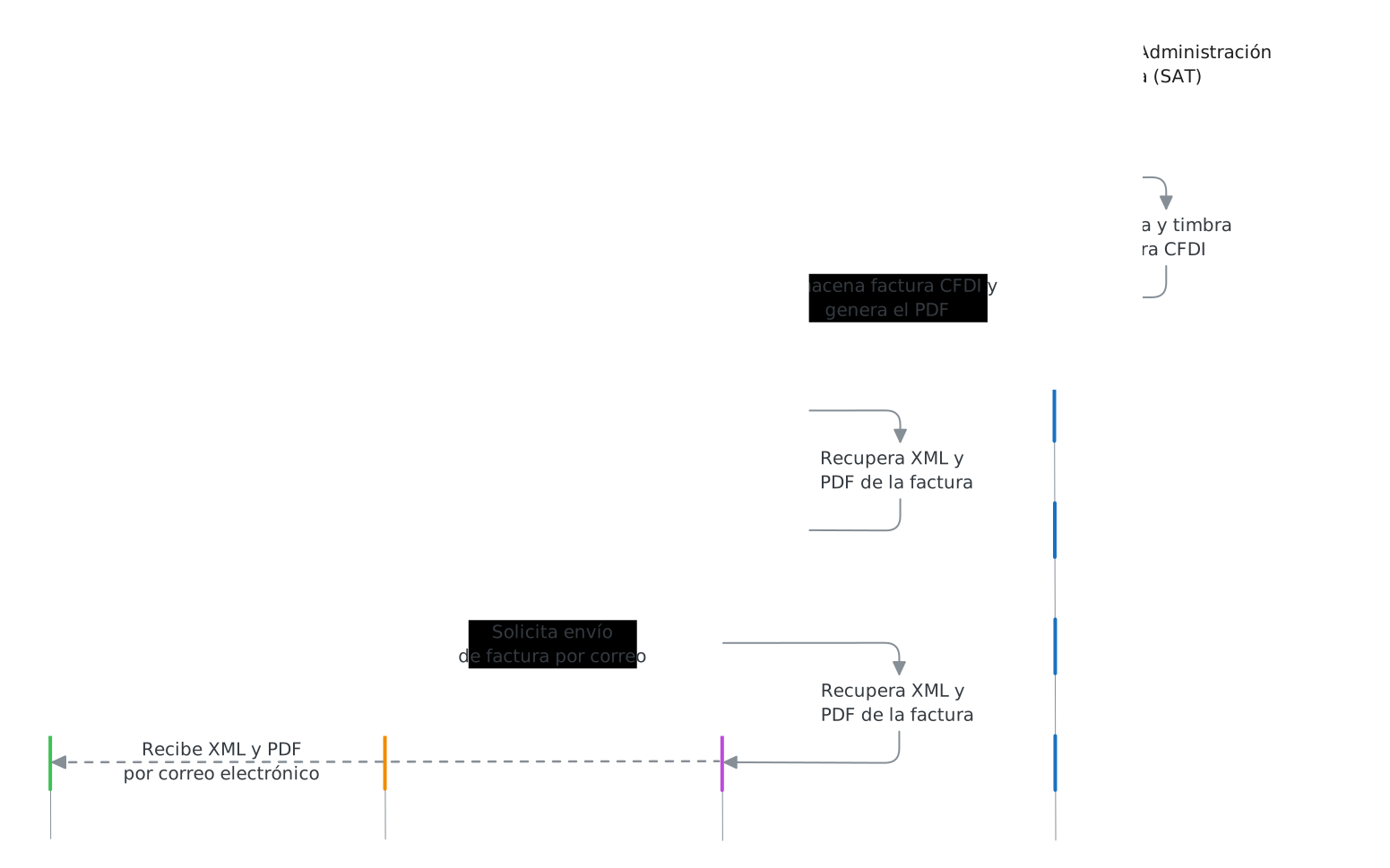
Fiscalapi integration architecture
Supported features
| Area | What it includes |
|---|---|
| Modes of operation | Invoice by value (you send every issuer, recipient, and item value in the request) and invoice by reference (you send the IDs of people and products already saved in Fiscalapi). |
| Environments | Test and production. |
| SDKs | .NET, Node.js, Python, PHP, and Java. |
| Postman collection | Sample API requests, ready to import into Postman and run. |
| Invoices | Income (I, the regular sales invoice), credit note (an Egreso CFDI, type E), payment (P), payroll (N, the CFDI issued for each salary payment), transfer (T, moves goods without a sale), and global invoice (factura global, one CFDI that groups a period's sales to the general public). |
| Complements (complementos, XML extensions the SAT defines for specific operations) | Payment, payroll, Carta Porte (the CFDI complement that documents the transport of goods in Mexico), Comercio Exterior (the CFDI foreign trade complement for exports), and local taxes. |
| SAT lookups | A CFDI's status and the SAT catalogs. |
| Bulk download (the SAT service that delivers the CFDIs a taxpayer issued and received) | Issued and received CFDIs and their metadata. |
| CFDI validation | Seven criteria for a stamped CFDI: XML structure, certificate validity, the issuer's digital seal (the issuer's signature over the CFDI, made with its CSD), the SAT seal (the seal inside the digital tax stamp that certifies the CFDI), its status with the SAT, and the issuer's presence on Lista 69-B (the SAT list of taxpayers presumed to issue invoices for nonexistent transactions, under Article 69-B of the Federal Tax Code) and Lista 69-B Bis (the SAT list of taxpayers involved in a presumed improper transfer of the right to offset tax losses, under Article 69-B Bis of the Federal Tax Code). |
| Auto-invoice portal, in beta (auto-invoice: a CFDI your customer requests from a ticket; you remain the issuer) | Your customers invoice their tickets (sales receipts they can later turn into CFDIs) from a portal, using the ticket's QR code. |
Other features
Your tenant has no limit on issuers, recipients, or people who sign in to it. With a single tenant, you issue invoices from any RFC (Mexico's taxpayer ID, Registro Federal de Contribuyentes) to any RFC and manage several independent companies or customers. From the dashboard, you manage issuers, recipients, people who sign in, API keys, CFDI products, invoices, tax files (the CSD and e.firma .cer and .key files you upload for a person), stamps (one credit each, used each time you stamp a CFDI), and reports.
Every CFDI includes its PDF at no extra cost, with the logo and colors you set for each issuer in its report rules (the logo, colors, and templates applied to an issuer's invoice PDFs). You can email the XML and the PDF at no cost and retrieve any issued invoice from the API or the dashboard, because Fiscalapi stores them.
You get personalized assistance at no cost before, during, and after your integration, plus priority technical support during business hours. You purchase and manage services and add-ons (an extra you add to your subscription, such as Auto CFDI invoicing) from the dashboard when you need them.
CFDI 4.0 complements
Fiscalapi generates complements from the data in your request. You send the payment, payroll, or transfer details as JSON, and Fiscalapi builds the complement node, applies the SAT validations, and adds it to the CFDI. You don't need to build the complement XML or keep its rules up to date when the SAT changes them.
This differs from solutions that only insert a complement you build into the CFDI. With those, the complement's XML, business logic, and compliance stay on your side.
Tutorials
Quickstart
Integrate Fiscalapi step by step, from signing up to issuing your first CFDI.
Access credentials
Get your API key and your tenant. You need both to authenticate your API requests.
Authentication
Authenticate every API request with your API key and your tenant in the X-API-KEY and X-TENANT-KEY headers.
Test data
Test cards, people, and tax files to activate a subscription, buy stamps, and stamp CFDIs in the test environment.
API modes of operation
The two modes of operation the API offers to create invoices: by reference and by value.
SAT validations
What each of the seven SAT validation criteria checks, how they are charged in credits, and how to read the verdict.
Resources
API keys
Create, retrieve, update, revoke, and list your tenant's API keys.
Issuers
Create, retrieve, update, delete, and list your tenant's invoice issuers.
Recipients
Create, retrieve, update, delete, and list your tenant's invoice recipients.
Tax files
Upload, retrieve, delete, and list a person's tax files.
Products
Create, retrieve, update, delete, and list products.
Invoices
Create, retrieve, cancel, email, and list invoices, and generate their PDFs.
SAT catalogs
List, retrieve, and search records in the SAT catalogs.
Introduction to SAT validations
What each of the seven validation criteria checks, how they are charged in credits, and how to read the verdict.
SAT validations
Validate a CFDI with the SAT: structure, certificate validity, digital seals, cancellation status, Lista 69-B, and Lista 69-B Bis.
Report rules
Customize the look of invoice PDFs with your brand or your customers' brands.